
External enclosure Raidsonic SR2600-2S-S2 RAID 0/1 controller for SATA/IDE HDD A01

€63.05*
Shipping within Germany: €4.99
Available, delivery time: 1-3 days
1 Stück verfügbar
Product information "External enclosure Raidsonic SR2600-2S-S2 RAID 0/1 controller for SATA/IDE HDD A01"
Condition: Used
RaidSonic Startdom Raidon SR2600-2S-S2 Silver RAID 0/1
This enables you to operate two SATA hard drives as a RAID 0 or RAID 1 array via an IDE or SATA controller.
(Optionally) configure two SATA hard drives as a RAID 0 array,
or alternatively as a RAID 1 array.
Does this sound complicated? In reality, it is very simple! For example,
you may have two SATA hard drives that you are currently not using, such as two 1 TB drives.
You can build a secure RAID system from these. These two hard drives fit into this enclosure, as shown in the image below...
The enclosure connects to the IDE or SATA controller. You can configure RAID settings via jumpers.
And thus you have a RAID system!
Do you have a RAID system!
To create a data server, take an old computer, install these cards, and make the hard drive in your network 'available'.
It is easy to operate... It is a RAID controller with two SATA hard drives installed,
not as a RAID add-on card, but as an 'external solution'.
These are two hard drive bays for SATA drives that connect to a 'normal' (non-RAID) controller
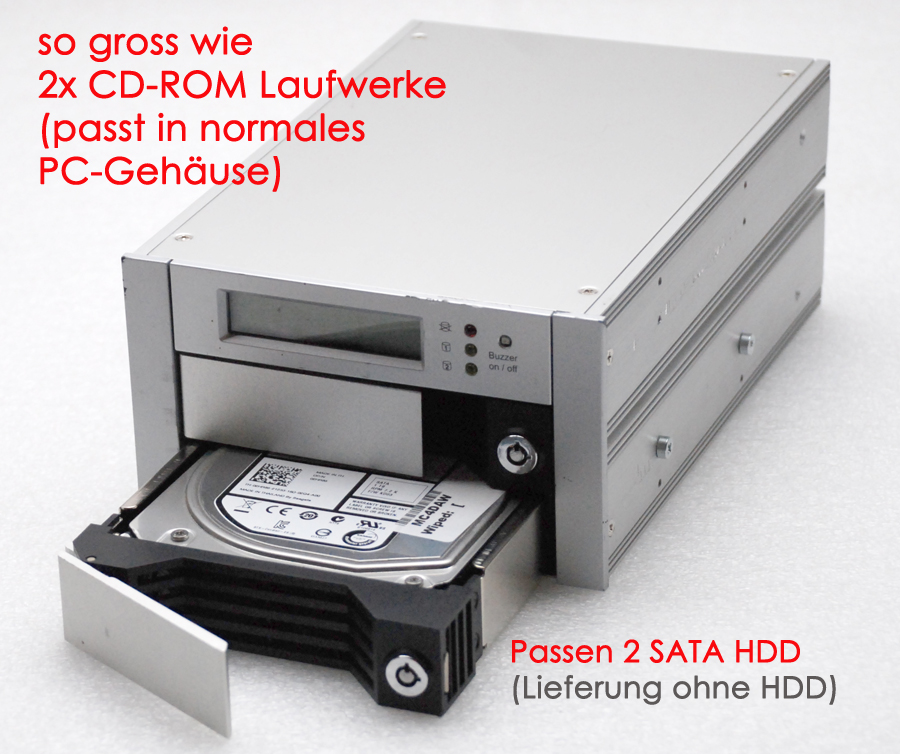
(optionally IDE or SATA, which you have in your PC) and form a RAID system for two SATA drives.
Inserts, now not as a RAID controller card but as an 'external solution'.
This includes 2 hard drive bays
for SATA hard drives to be used with a 'standard' (non-RAID) controller
(either IDE or SATA,)
...connect to the drives currently in your PC and create a RAID system for 2x SATA
Hard drives (please refer to the image below for IDE and SATA connectors).
Power is supplied from the PC power supply unit (see bottom right of the image below).
The system requires as much space in your
PC case as two CD-ROM drives. Theoretically,
(and also practically) this RAID system can be operated as an external solution,
now you must run the data cable from the
controller and power supply from the PC PSU to the outside.
If you wish to refresh your knowledge of what RAID 0 and RAID1 can offer you,
I have compiled a good deal of information for you:
ID 0
RAID Level 0 is a hard drive array consisting of two or more hard drives. This hard drive array possesses special characteristics that a single hard drive does not have. The "0" in RAID Level 0 stands for zero data redundancy. Since data is distributed alternately across two or more hard drives, this method is also referred to as striping.
In RAID Level 0, two or more hard drives are combined into a single large logical drive. The total size of the RAID depends on the smallest hard drive multiplied by the number of hard drives; therefore, it is recommended to use hard drives of equal capacity as much as possible. Data is divided into blocks, typically of 64 or 128 KB (stripe). Hence the name striping. A block of 128 KB data is split into two 64 KB blocks and written alternately to at least two hard drives. With more hard drives, the block is split multiple times and distributed across all drives.
Advantages of RAID 0. While a single hard drive is occupied with storing a data block, in RAID 0 the RAID controller distributes the data block and the write operation across multiple drives. Ideally, this results in access speeds to the logical drive being at least double. Similarly, when reading data from two or more drives, the transfer rate is much faster than reading from a single hard drive.
Disadvantages of RAID 0
Because the data is distributed across two or more hard drives, the risk of hardware failure increases. If one drive fails, all data is lost because practically only half of every stored file remains readable. If part of a file is missing, the rest of the file cannot be recovered. In such cases, data recovery in the classical sense is no longer possible. With RAID Level 0, the probability of failure is higher than with a single hard drive. It increases with each additional hard drive in the RAID system.
The advantages of RAID 0 (high transfer rates) do not outweigh the disadvantages (increasing risk of failure). The array is defective if a hard drive fails or if the controller or operating system causes an error during writing. Even in the case of a motherboard defect, the hard drives cannot be easily installed into another system to access the data.
Applications for RAID 0. Therefore, RAID Level 0 is suitable exclusively for increasing speed. However, this applies only to sequential data transfers. When reading and writing large files sequentially, all hard drives can be utilised simultaneously. Thus, at least in theory, the data transfer rate adds up. With only a few small files, an increase in speed does not really come into its own.
As an application for RAID 0, logical drives with temporary data or large data volumes that must be cached before further processing are suitable.
In classic server operation, this RAID level is unsuitable. RAID 0 is only useful if the highest possible write and read speeds are required and a higher risk of data loss is accepted at the same time.
With RAID Level 1, two physical hard drives are connected to form a logical drive. The RAID controller writes all data onto both hard drives simultaneously, so that the storage space on both drives is always identical. For RAID 1, the hard drives are usually available in pairs. The capacity of the logical drive is determined by the smallest hard drive. As a rule, two identical hard drives are used. A variant of RAID 1 is duplexing, where each hard drive has its own controller. If one controller fails, the system can continue to operate with the second controller and the attached hard drive.
Advantages of RAID 1: When writing, the RAID is only as fast as the slowest drive can write. When reading, RAID 1 is at least faster than a single drive because the controller outputs data from whichever drive delivers it first. If the RAID controller intelligently distributes read requests across both drives, the read speed can theoretically be doubled. If one drive fails, you can continue working with the other without data loss and with minimal speed reduction.
Disadvantages of RAID 1: Although this RAID level enables 100% redundancy, it is also the most expensive RAID level. For storage capacity, you practically always have to pay double the price. Alternatively, for the same price, you get only half as much storage space. The reason is that only half of the available storage capacity is usable. Two hard drives with 500 GB each would total 1,000 GB. However, because RAID 1 mirrors the data, only 500 GB are available.
Applications of RAID 1
RAID 1 halves the available storage capacity, making it expensive. In return, it offers maximum data security and availability. This is practical for small servers. Large data volumes are better stored with higher RAID levels.
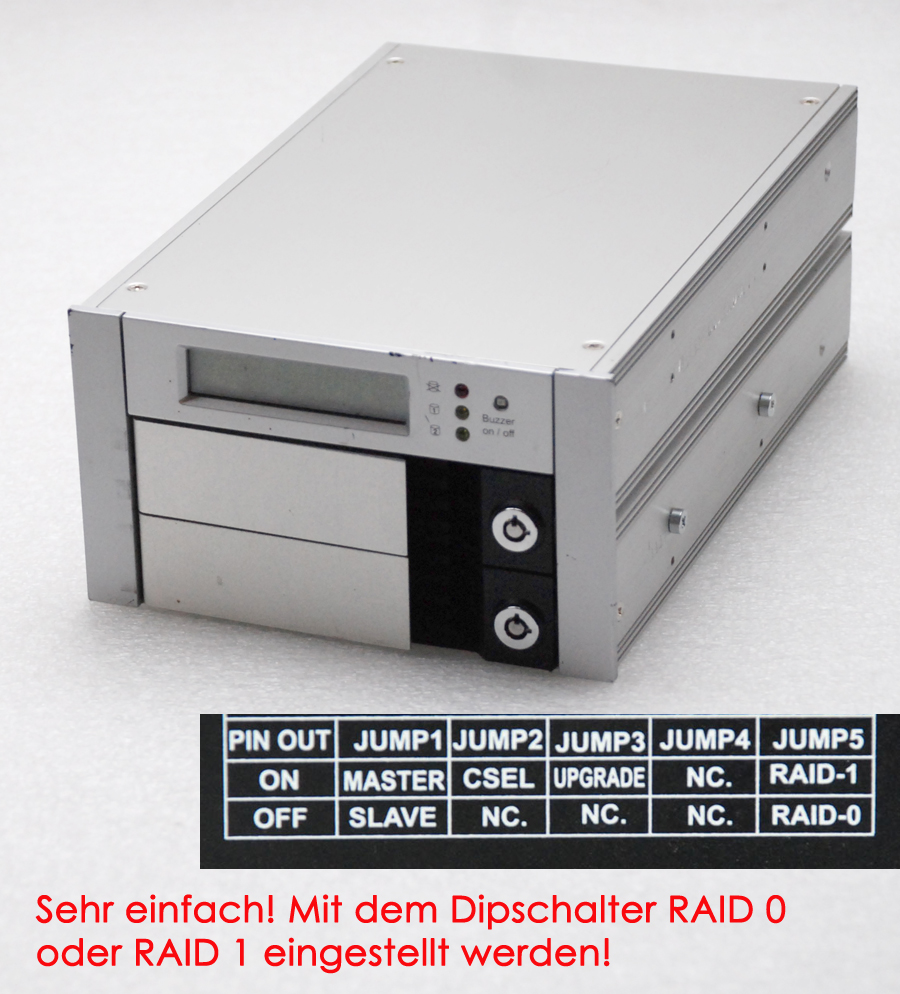
Technical specifications:
Internal SATA RAID system made of aluminium
Consists of 2x HDD trays for SATA hard drives
Hard drive capacity: We tested with 2 TB, and it works very well
Space requirement: equivalent to 2 CD drives
Connects to the SATA or IDE host interface
Operates without IRQ or TSR drivers
Connects to an IDE or SATA controller; no additional card is required
High data security through real-time hard drive mirroring
Easy replacement of hard drives while operating (Hot Swap)

Technical Specifications
| Brand | RAIDSONIC |
|---|---|
| Manufacturer Part Number | Not applicable |
| EAN | Not applicable |
| Condition: | Used |
|---|
Login
